Why AI-built apps need a bug tracker.
AI made the building part fast. It did nothing to help you remember the bug you found last week, or which TestFlight build has the fix. DevBench keeps every bug, idea, change and task for each app in one list.

 An app by Andrew MastracchioVisit the main site
DevBench is a bug tracker for iPhone, iPad and Mac, made for people who build apps with AI coding agents. Save a bug from a screenshot the moment you notice it, let Claude Code, Codex or Cursor read it and fix it on your Mac, and see which build each fix is in.
Give it a name and a short key, such as WTH. Every item gets an ID from it: WTH-1, WTH-2 and so on.
Take a screenshot, mark it up, tap Share and choose DevBench. Siri, Control Center, the Action button and ⌘N work too.
Ask Claude Code, Codex or Cursor on your Mac to fix it. It reads the bug from DevBench, fixes it, writes down the cause and fix, and moves it to Testing.
Record the build the fix is in, or let your agent do it. Then follow that build through TestFlight, App Review and the App Store, and the fix moves with it.
AI made the building part fast. It did nothing to help you remember the bug you found last week, or which TestFlight build has the fix. DevBench keeps every bug, idea, change and task for each app in one list.
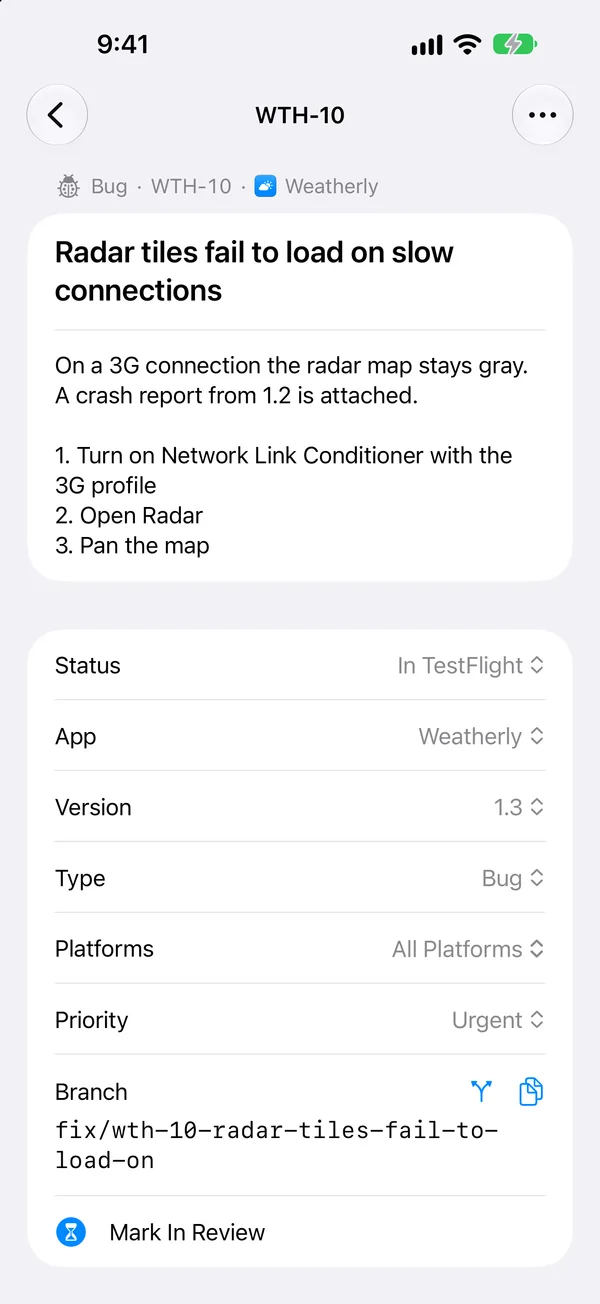
Each bug keeps its screenshots, notes, checklist and branch name. Your agent reads them from DevBench, so you don’t paste the same explanation into every new chat.
Each app has its own list, grouped by version. Smart lists such as Bugs, High Priority and In Progress cover all your apps at once. There are no team accounts.
Export for Coding Agent saves Markdown files with each bug’s notes, checklists, screenshots and a prompt. When the agent is done, its resolution file brings the cause and fix back into DevBench.
DevBench works with Claude Code, Codex, Cursor, VS Code and Claude Desktop over MCP. You add it to each one once, for every project, with one copied command or one click in the Mac app. Any other tool that supports MCP can connect too, and any agent can work from a Markdown export.
No. DevBench works on its own as a bug tracker and release checklist.
No. DevBench has no servers and doesn’t read your source code. Your library stays on your devices and, if you turn on sync, in your private iCloud account.

DevBench is for iPhone, iPad and Mac, and your coding agent can read it too.
Join the TestFlight beta